

Quick answer
AI add-ins for Excel turn a plain-English request into a formula, VBA script, or template, without you looking up syntax. We tested five of the most popular ones (AI-aided Formula Editor, Lumelixr.ai, Ajelix, Formula Bot, and AIExcelBot) and all five still work the same way: you describe what you want in a side panel, the AI writes the formula, and you paste it into the cell. Free plans cap you at around 5 requests a month; paid plans start near $5 to $6 a month for unlimited use.
Excel can do almost anything. Basic or complex calculations, formulas and functions that get the most out of your data, charts, VBA, macros, and a long list of other tools.
Working with data in Excel gets slow when you can’t find the right formula. You can usually track it down with a quick search, but AI-powered add-ins now do that work for you.
Microsoft’s own Copilot for Excel is still rolling out gradually, but Excel already lets you install third-party add-ins, and several of them run on AI. How real is that, and do they actually help your productivity? We tested the 5 most popular AI add-ins for Excel. Here’s what we found.
What you’ll learn in this article
- What an AI add-in for Excel actually is
what it can and can’t do, and where it fits next to Microsoft’s own Copilot for Excel. - What 5 popular AI add-ins do, side by side
AI-aided Formula Editor, Lumelixr.ai, Ajelix, Formula Bot, and AIExcelBot, with the pros and cons we found testing each one. - Free plan limits and paid pricing for each tool
how many free requests you get a month and what unlimited access costs once you need more. - What to watch out for before you paste in your data
why these tools run outside Excel and what that means for sensitive spreadsheets. - When an AI add-in helps and when it doesn’t
why none of these tools replace a working knowledge of Excel formulas.
By the end of this article: you’ll know what each of these 5 AI add-ins does well, what it costs, and whether it’s worth installing for your own spreadsheets.
Reading time: 9 minutes | Level: beginner to intermediate | For: anyone who writes Excel formulas and wants to do it faster
What are AI add-ins for Microsoft Excel?
An add-in for Microsoft Excel is an extra file you install in Excel to add new or improved features. Third-party developers build these add-ins to extend what Excel can do in specific areas: data analysis, data visualization, task automation, or connecting to other software.
Add-ins can bring a wide range of functions and features. Some generate advanced reports and charts, run complex data analysis, automate repetitive tasks, or connect to external databases.
Now let’s walk through the AI-powered add-ins we tested for Excel.
AI-aided Formula Editor
AI-aided is an add-in that helps you build formulas by combining AI with GPT-4 technology. Just like with ChatGPT, you write your formula request in plain language based on the data in your cells.
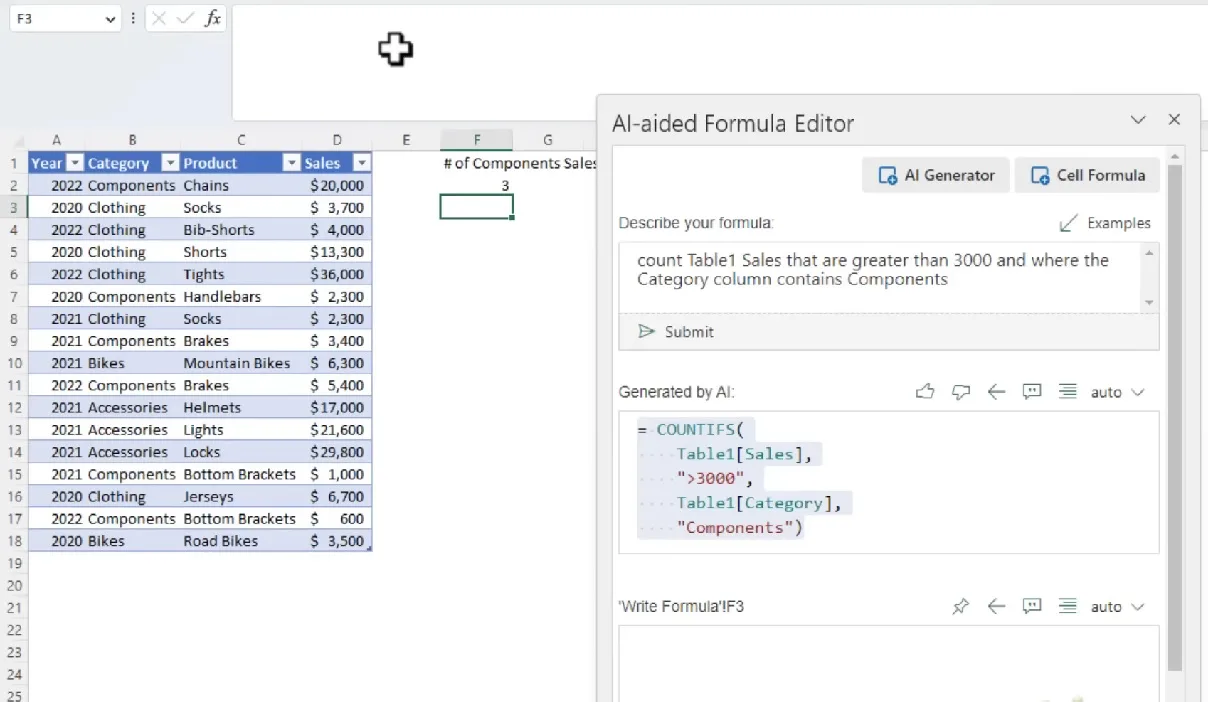
Pros:
- Accepts your request in any language.
- You can copy and paste what it generates straight into the cell.
- Explains the formula it gives you.
- Easy to get through Microsoft 365 add-ins.
Cons:
- It’s an external assistant, not built into the spreadsheet, so a subscription unlocks the full version.
- Only 5 free requests. More queries require a subscription.
- The paid plan always adds more tools, including:
- Unlimited requests
- More accurate answers
- Faster response times (priority during high demand)
- Explain and generate scripts and formulas
- See what formulas other users generate and share
- Access a user-shared library
- Download the Excel add-in
- Useful Excel tips available on the dashboard
- Priority support
- Frequent updates and new features
Lumelixr.ai
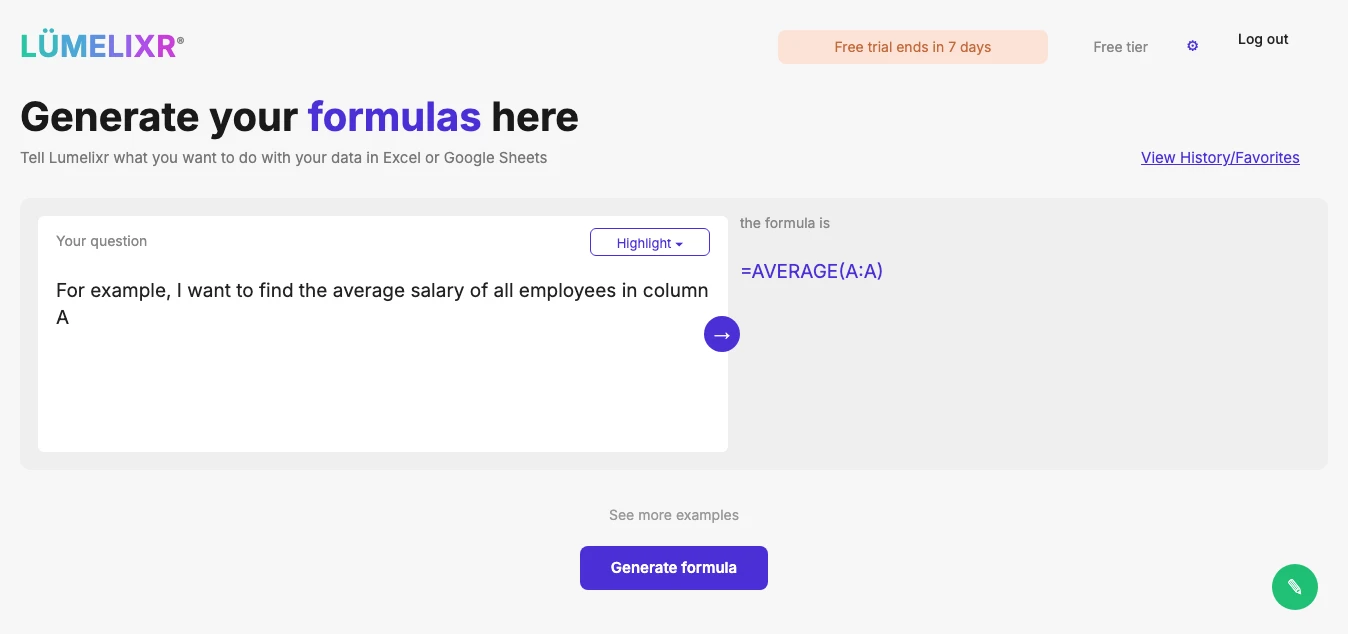
A formula generator powered by AI that turns your request into a formula.
Pros:
- Accepts several languages.
- Keeps a history of your past queries tied to your account.
- Has a Google Chrome extension.
- Includes a help chat.
Cons:
- Free for 7 days, but you need to subscribe with a credit card. Once the trial ends, you can switch to a monthly or annual plan.
- The help chat isn’t live. You wait for someone to pick up your case.
Ajelix
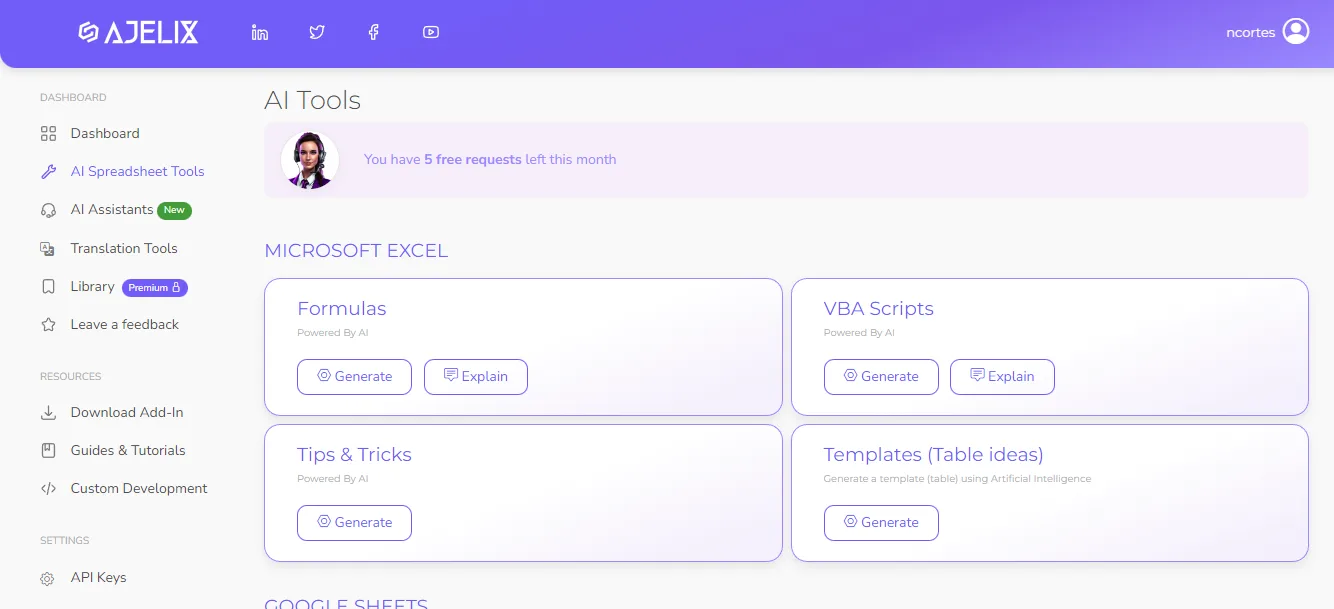
Ajelix packs a set of AI-powered tools. Some of them:
- Excel Formula Generator: builds a formula from a plain-language request.
- Excel VBA Script Generator: generates VBA scripts.
- Excel Template Generator: builds a spreadsheet from a keyword.
- Excel Formula Explainer: breaks down what a formula does and how it works.
- Excel VBA Script Explainer: explains VBA scripts.
Pros:
- Accepts requests in 28 languages, and you can translate both the text used to build a formula and a whole file.
- Has a “formula library” for working with your team.
- Translates the text inside a VBA script.
- Includes an AI-powered virtual assistant.
Cons:
- It’s an external assistant, not built into the spreadsheet, so a subscription unlocks the full version.
- Only 5 free requests. More queries require a subscription.
- The paid plan always adds more tools, including:
- Unlimited requests
- More accurate answers
- Faster response times (priority during high demand)
- Explain and generate scripts and formulas
- See what formulas other users generate and share
- Access a user-shared library
- Download the Excel add-in
- Useful Excel tips available on the dashboard
- Priority support
- Frequent updates and new features
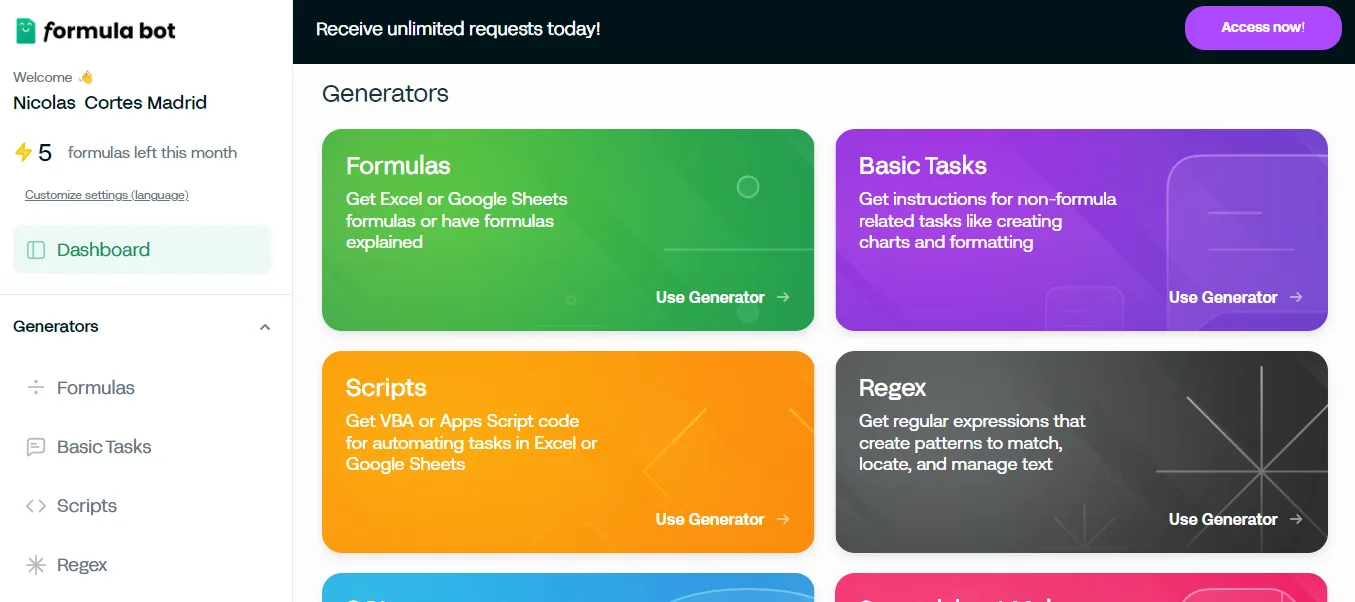
Formula Bot
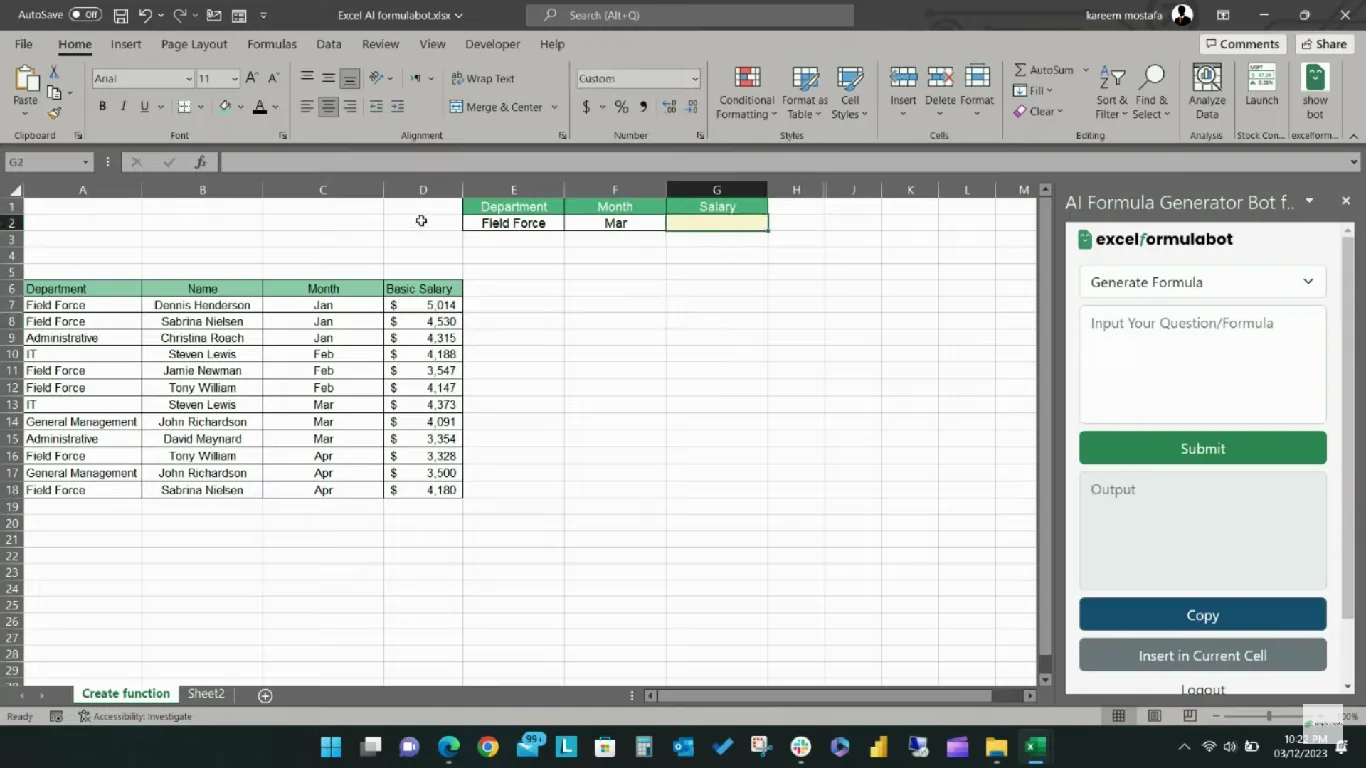
Turns plain-language instructions into Excel or Google Sheets formulas, and the whole platform explains what you need to do and how to do it.
Pros:
- Translates both the site and the Excel formulas.
- You can copy and paste the formula it gives you straight into the cell.
- You can install it as a free add-in in Microsoft Excel.
- Comes with a useful spreadsheet builder.
- You can request VBA code.
- Can generate SQL queries.
- Understands instructions written in Spanish.
Cons:
- Each user gets 5 free requests a month.
- The PRO plan adds more tools.
- The PRO plan adds templates.
- No video or live support.
AIExcelBot
An AI-powered formula generator with VBA tools.
Pros:
- Generates an Excel formula from a short, plain-language request in seconds.
- Has a Chrome extension: AI Excel Bot, ChatGPT Excel Assistant.
- Simplifies complex Excel or Google Sheets formulas.
- Can write VBA and explain it in seconds.
- Understands other languages.
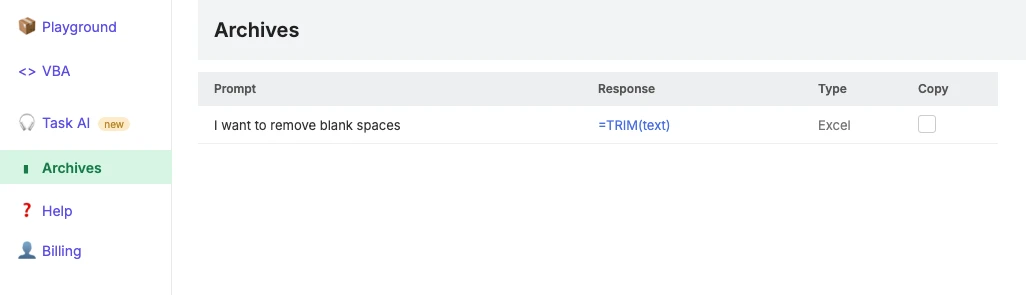
- Stores your past queries in an archive.
Cons:
- 5 attempts on the free plan.
- You pay for the PRO option if you need more.
- No video or live support like the other tools.
Conclusions
Using AI add-ins for Excel is a good way to find formulas faster and cut down on calculation time. They can also help with VBA scripts. Still, keep in mind that an AI add-in won’t do everything for you. You need a baseline knowledge of Excel to get the most out of these tools.
Ninja Summary
- All 5 add-ins turn a plain-language request into a formula, VBA script, or template.
- Free plans cap you around 5 requests a month; paid plans run roughly $5 to $6 a month for unlimited use.
- None of them replace Excel knowledge: you still need to understand what the formula does before you trust it.
Recommended reading 👇
Excel ROUNDUP function: round numbers up
Ninja Tip
Before you paste company data into any of these tools, check what the add-in does with it. Most run your request through a third-party AI model outside Excel, so treat it the same way you’d treat pasting data into a public chatbot: fine for sample numbers or a generic formula question, risky for anything with real customer or financial data.
Take the next step with real Excel skills
An AI add-in writes a formula for you in seconds, but it can’t tell you when the logic is wrong for your specific data. A formula like =XLOOKUP(A2,B:B,C:C) only helps if you can check the result and adapt it. Add-ins save time for people who already understand Excel. They’re not a substitute for that knowledge.
Still searching for the right formula every time?
The functions that save you hours stick when you practice them. In Ninja Excel’s courses, you solve exercises inside real Excel, with live classes, and if your company sponsors the training, your team lead can see your progress.
You start with a level check, so you don’t repeat what you already know.
FAQ
Are these AI add-ins free?
Most offer a free plan with a low monthly cap, usually around 5 requests. AI-aided Formula Editor, Ajelix, Formula Bot, and AIExcelBot all cap the free tier at about 5 requests a month; Lumelixr.ai instead gives you a 7-day free trial that requires a credit card upfront. Paid plans for unlimited use generally run from about $5 to $6 a month.
Do I need to know Excel to use an AI add-in?
Yes. An AI add-in writes the formula for you, but you still need to know what a correct result looks like. If the add-in misreads your request, it can hand you a formula that runs without errors and still returns the wrong number.
Which of these add-ins works best for VBA scripts?
Ajelix, Formula Bot, and AIExcelBot all generate and explain VBA scripts. Ajelix also translates the text inside a script, and Formula Bot adds support for Google Apps Script and SQL queries on top of VBA.
Can I use these add-ins in a language other than English?
Yes, in most cases. AI-aided Formula Editor, Lumelixr.ai, Ajelix, and AIExcelBot accept requests in multiple languages, and Ajelix specifically supports translation across 28 languages. Formula Bot understands instructions written in Spanish as well as English.
Is it safe to paste my spreadsheet data into these tools?
Treat it like any other third-party AI tool: these add-ins send your request, and sometimes your data, to a server outside Excel to generate the formula. Avoid pasting sensitive customer or financial data, and stick to sample numbers or column names when you can.
What’s the difference between these add-ins and Microsoft’s own Copilot for Excel?
Copilot is built by Microsoft and integrates directly with Excel’s interface and your Microsoft 365 account. The add-ins we tested are third-party tools installed separately, with their own accounts, pricing, and AI models.
Do these add-ins replace learning Excel formulas?
No. They speed up writing a formula you already understand conceptually. They don’t teach you why a formula works, so you still need a base level of Excel knowledge to catch mistakes and adapt the result to your own data.