

Quick answer
ROUNDUP in Excel rounds a number away from zero, to a set number of digits. Unlike ROUND, it never rounds down: 0.2 and 0.7 both become 1. Its syntax is =ROUNDUP(number, num_digits), where a positive num_digits rounds decimals, zero rounds to a whole number, and a negative value rounds to the nearest ten, hundred, or thousand. It works in every version of Excel, plus Excel for the web and Google Sheets.
ROUNDUP pushes a number away from zero, to however many digits you need. It never looks at whether the next digit is a 5 or higher, the way ROUND does: it just rounds up, every time.
That makes it useful whenever a result has to cover a minimum, instead of landing on the closest value. Think of material you buy by the meter, a shipping weight you round up to the next kilogram, or a price you round up to the nearest cent after tax.
This guide covers the syntax, five worked examples, and the mistakes that trip people up most.
What you’ll learn in this article
- What ROUNDUP does and its full syntax
the two arguments, which one is optional, and how the function decides which way to round. - How to round to a whole number
a worked example on fruit weights, with the formula and the verified result. - How to round to a set number of decimals
what each positive value of num_digits does, from one decimal to three. - How to round to the nearest ten, hundred, or thousand
what a negative num_digits does, and where that trips people up. - How ROUNDUP handles negative numbers
why “rounding up” means moving away from zero, not toward a bigger number. - How to nest formulas and functions inside ROUNDUP
two examples: a division and a SUM, both rounded up in a single formula.
By the end of this article: you’ll be able to write any ROUNDUP formula, pick the right num_digits for the job, and combine it with other functions in the same cell.
Reading time: 10 minutes | Level: beginner | For: anyone who builds reports, budgets, or quotes in Excel
What does the ROUNDUP function do in Excel?
ROUNDUP takes a number and rounds it away from zero, to a number of digits you choose. “Away from zero” is the key part: a positive number always goes up, and a negative number always goes further down, toward negative infinity.
The syntax has two arguments, and both are required:
=ROUNDUP(number, num_digits)
- number: the value you want to round up.
- num_digits: how many digits to keep. A positive value rounds decimals, zero rounds to a whole number, and a negative value rounds to a ten, hundred, or thousand.
Ninja Summary
- ROUNDUP always moves a number away from zero, no matter what the next digit is.
- Both arguments are required:
numberandnum_digits. - A positive, zero, or negative num_digits changes where the rounding happens.
What does ROUNDUP look like with a simple number?
\n\n
Before the fruit example, look at six plain numbers, some negative, some with a decimal under .5 and some over it:
\n\n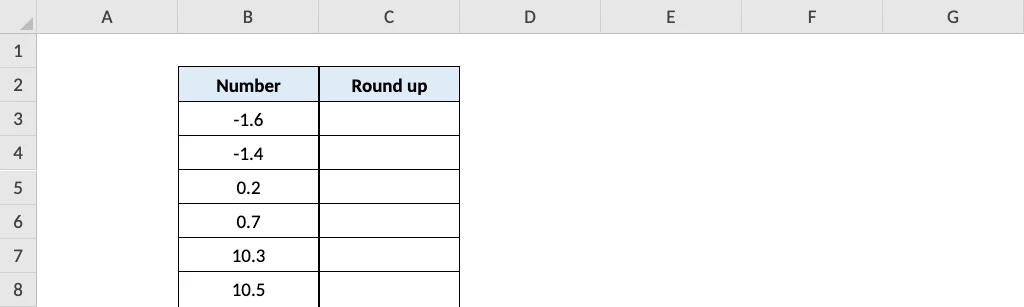 \n\n
Applying =ROUNDUP(B3,0) down the column gives:
\n\n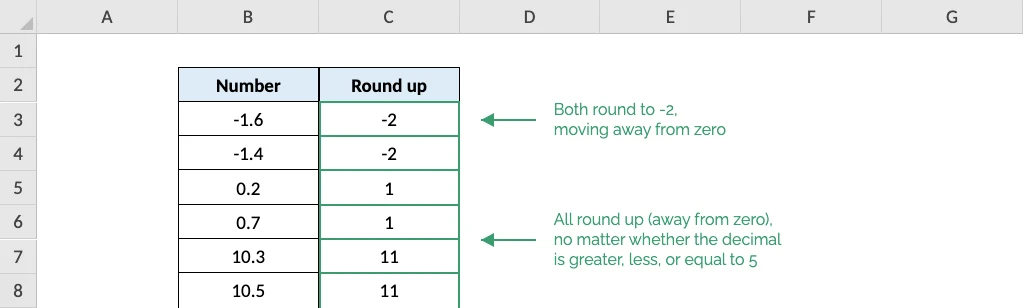 \n\n
0.2 and 0.7 both round up to 1, even though 0.2 is much closer to 0. The same happens with -1.6 and -1.4: both round up to -2. ROUNDUP never checks how close a number already is, it just moves it away from zero.
How do you round up to a whole number?
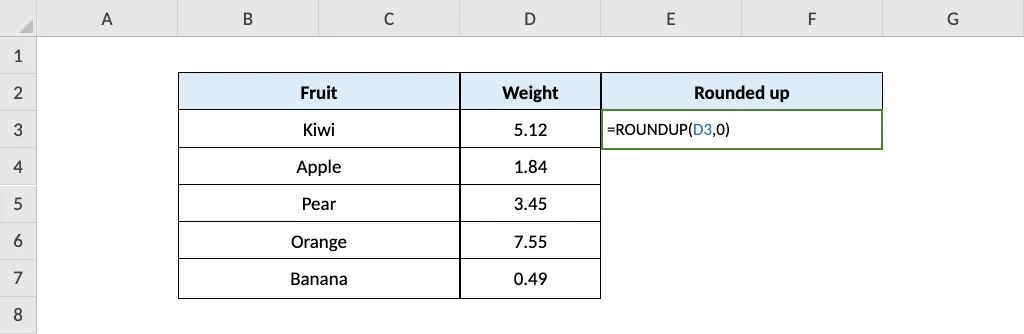
Say you have the weight of five fruits, and you want each one rounded up to a whole kilogram.
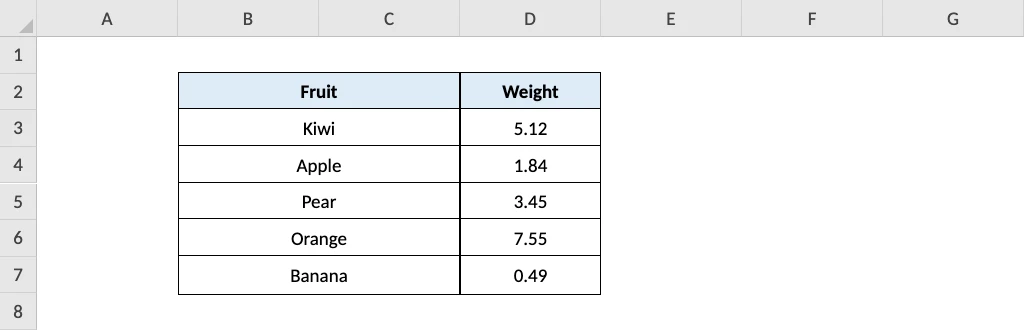
Since you want zero decimals, num_digits is 0. The formula for the first row is =ROUNDUP(D3,0):
Copy that formula down, and you get:
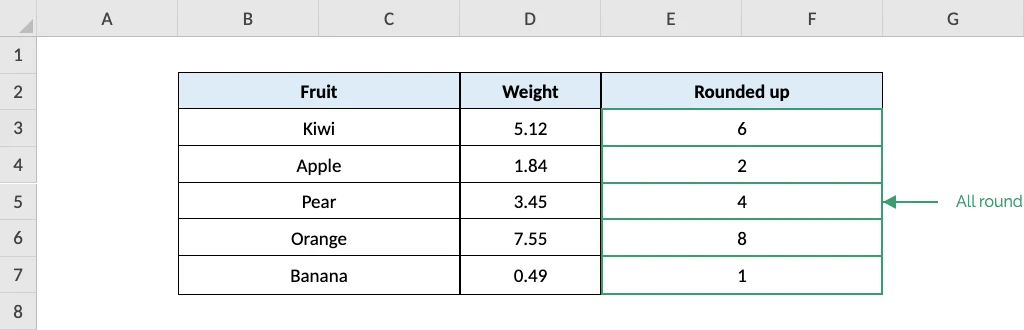
Notice that 1.84 and 7.55 round up just as readily as 5.12: ROUNDUP doesn’t care how close a number already is to the next whole number, it rounds up regardless.
How do you round up to a set number of decimals?
num_digits also controls how many decimals you keep. Take the distance from the sun of four planets, in millions of kilometers:
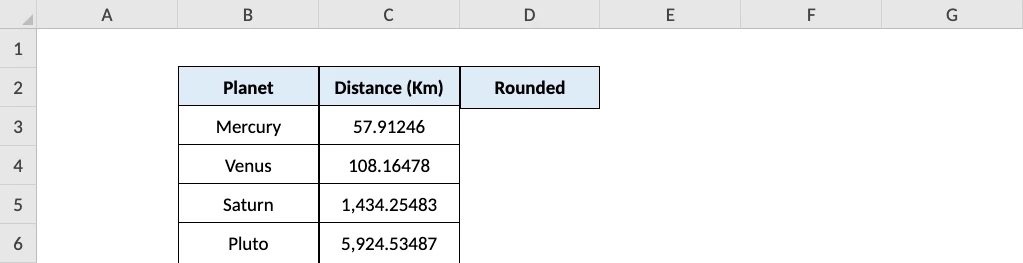
Round Mercury to a whole number, Venus to one decimal, Saturn to two, and Pluto to three. That means =ROUNDUP(C3,0) for Mercury, =ROUNDUP(C4,1) for Venus, =ROUNDUP(C5,2) for Saturn, and =ROUNDUP(C6,3) for Pluto. The result:
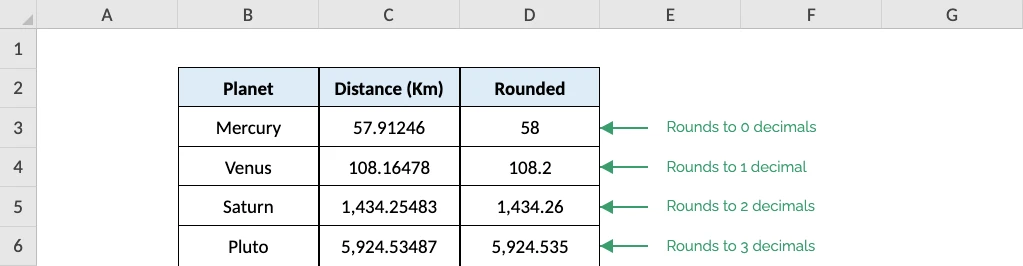
There’s no upper limit on num_digits. You can round to 3 decimals, or to 10, if the number has them.
Ninja Summary
- num_digits set to 0 rounds up to a whole number.
- A positive num_digits (1, 2, 3…) keeps that many decimals, always rounded up.
- There’s no maximum: num_digits can be as high as the number of decimals you have.
How do you round up to the nearest ten, hundred, or thousand?
A negative num_digits does the opposite: it rounds to the left of the decimal point, to a ten, a hundred, or a thousand.
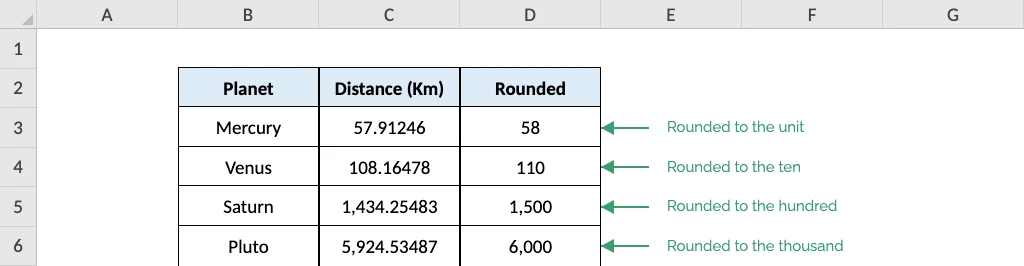
Using the same planet distances, round Mercury to the nearest unit, Venus to the nearest ten, Saturn to the nearest hundred, and Pluto to the nearest thousand: =ROUNDUP(C3,0), =ROUNDUP(C4,-1), =ROUNDUP(C5,-2), and =ROUNDUP(C6,-3).
Ninja Tip
When you round to the nearest thousand, a number right at 1,000 still rounds up to 2,000 if it’s even slightly over (1,001 becomes 2,000). Remember that ROUNDUP never checks how close the number already is, so a value just past a round number jumps a whole unit.
How does ROUNDUP handle negative numbers?
“Rounding up” with negative numbers still means moving away from zero, which in practice makes the number more negative. Take six monthly temperatures in Yakutsk:
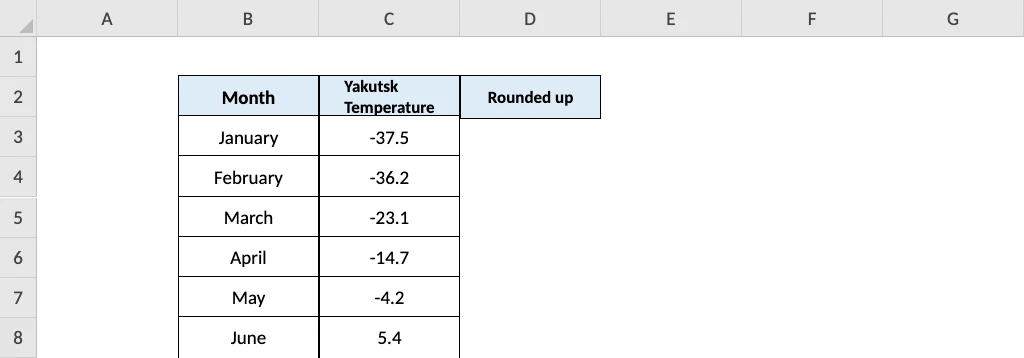
Applying =ROUNDUP(C3,0) down the column gives:
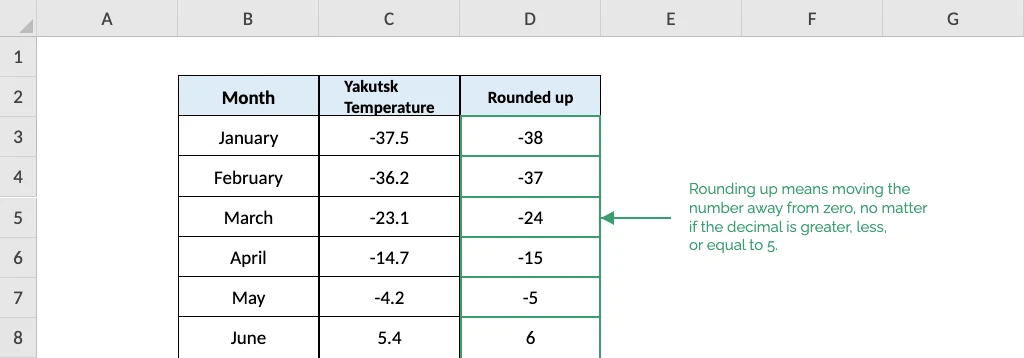
-37.5 becomes -38, not -37. It doesn’t matter that -37.5 is exactly halfway: ROUNDUP always moves further from zero, so a negative number ends up smaller, not larger.
Ninja Summary
- With negative numbers, “rounding up” means the result gets more negative, not less.
- -37.5 rounds up to -38, never to -37.
- The direction is always away from zero, on both sides of the number line.
How do you nest formulas and functions inside ROUNDUP?
You can put any calculation inside the number argument: a division, a sum, or another function. Excel solves what’s inside first, then rounds up the result.
Say you have the total weight of a batch of pears, in grams, and the number of pears in the batch, and you want the weight per pear rounded up to two decimals.
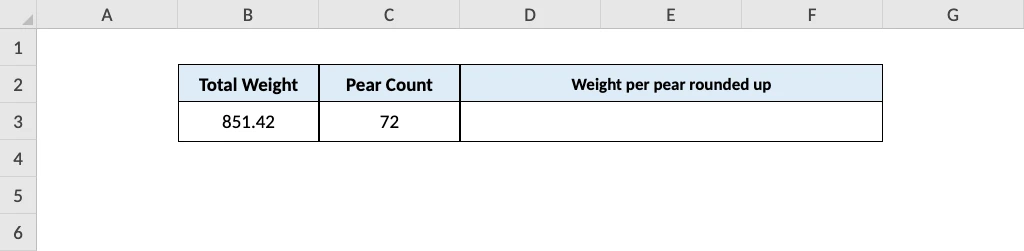
Divide the total weight by the pear count, and round that division up to 2 decimals: =ROUNDUP(B3/C3,2).
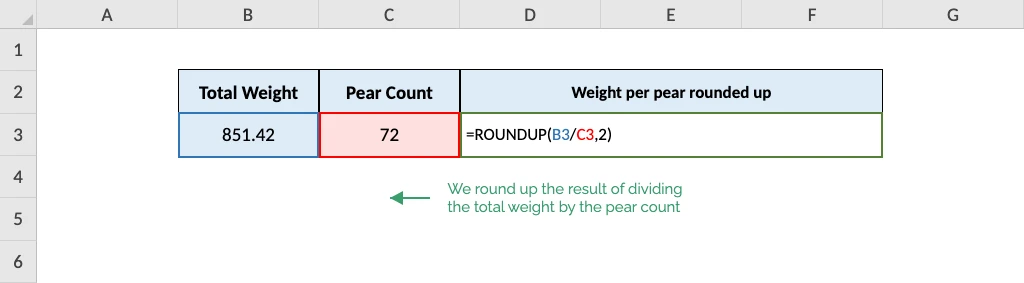
The result:
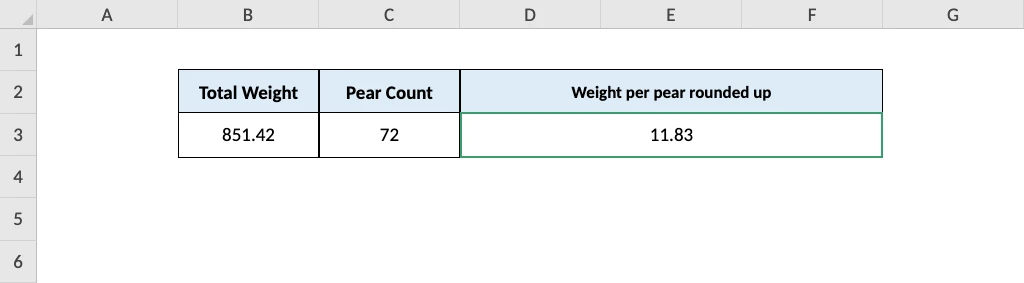
So each pear weighs 11.83 grams, once you round the division up to two decimals.
Now take a SUM instead of a division. You have the weight of five fruits, and want the total weight added up and rounded up to a whole number.
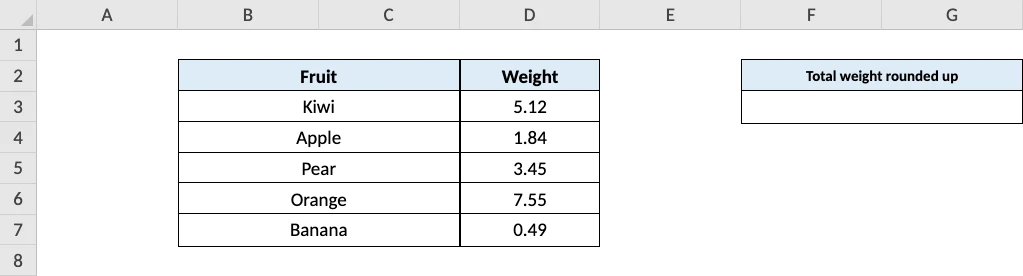
Add up the weights with SUM, then round that total up to zero decimals: =ROUNDUP(SUM(D3:D7),0).
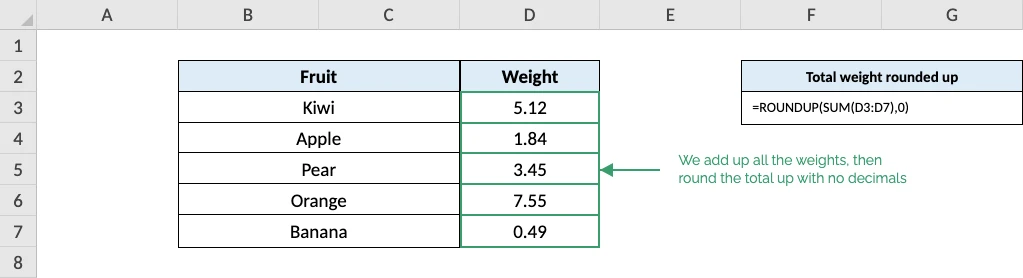
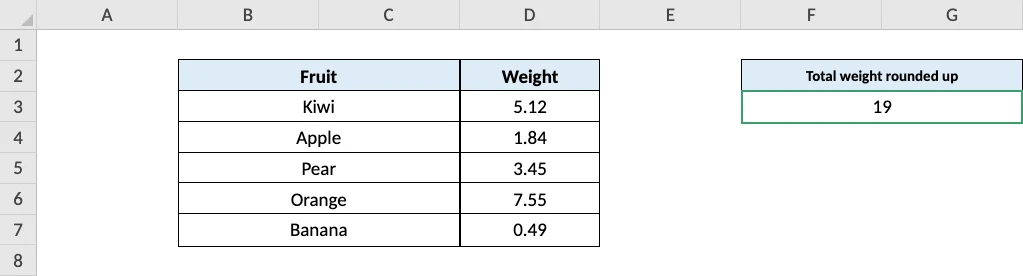
5.12 + 1.84 + 3.45 + 7.55 + 0.49 adds up to 18.45, and ROUNDUP takes that straight to 19, since it never rounds down even when the decimal is below .5.
Ninja Tip: ROUNDUP also has two relatives worth knowing. ROUND rounds to the closest value, up or down, the way most people round by hand. ROUNDDOWN does the opposite of ROUNDUP: it always moves toward zero, so 18.45 would become 18 instead of 19.
Benefits of using ROUNDUP in Excel
ROUNDUP guarantees a result that always covers the original number, which matters whenever rounding down would leave you short: a budget, a material order, a shipping estimate, or a price that includes tax. It takes two arguments, works in every version of Excel, and combines cleanly with any other formula.
Take the next step with ROUNDUP
Once you’re comfortable with the two arguments, try rounding the same number with ROUND, ROUNDUP, and ROUNDDOWN side by side, so you can see the three behaviors on the same data.
Still rounding numbers by hand?
Functions like ROUNDUP save hours once they’re second nature. Ninja Excel courses have you solve exercises inside real Excel files, with live classes, and if your company is paying for the training, your manager sees your progress report.
You start with a level check, so you never repeat what you already know.
FAQ
What’s the difference between ROUND and ROUNDUP in Excel?
ROUND looks at the next digit and rounds to the closest value, up or down, the way you’d round by hand. ROUNDUP ignores that digit completely and always moves away from zero. =ROUND(18.45,0) returns 18, while =ROUNDUP(18.45,0) returns 19.
What’s the difference between ROUNDUP and ROUNDDOWN?
They round in opposite directions. ROUNDUP always moves away from zero, so a number gets bigger (or more negative). ROUNDDOWN always moves toward zero, so a number gets smaller (or less negative). Both share the same syntax: =ROUNDDOWN(number, num_digits).
Does ROUNDUP work with negative numbers?
Yes, and “rounding up” still means moving away from zero, so a negative number becomes more negative. =ROUNDUP(-1.4,0) returns -2, not -1.
What does a negative num_digits do in ROUNDUP?
It rounds to the left of the decimal point instead of to the right. -1 rounds to the nearest ten, -2 to the nearest hundred, and -3 to the nearest thousand. =ROUNDUP(108.16,-1) returns 110.
Is there a limit to how many decimals ROUNDUP can keep?
No. num_digits can be as large as the decimals in your number. There’s no fixed maximum built into the function.
Does ROUNDUP exist in Google Sheets?
Yes. Google Sheets uses the same name and the same two arguments, =ROUNDUP(value, places), and it behaves the same way: it always rounds away from zero.
Can I use a formula or another function as the number argument in ROUNDUP?
Yes. Excel calculates whatever is inside first, and then rounds up that result. You can nest a division, like =ROUNDUP(B3/C3,2), or another function, like =ROUNDUP(SUM(D3:D7),0).